
AI Song Generator - Jukebox
TWOWISE Bilgi Teknolojileri Limited SirketiMusic & Audio
4.71.10K Reviews
- Version
- 3.3.0
- Installs
- 5.00M
- Age Rating
- Everyone
Screenshots

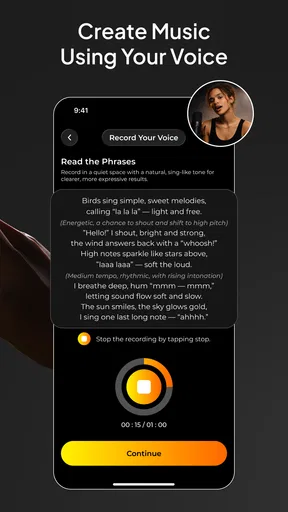
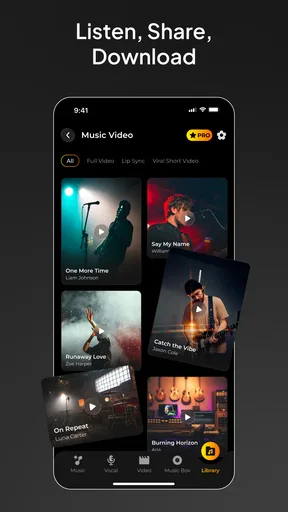
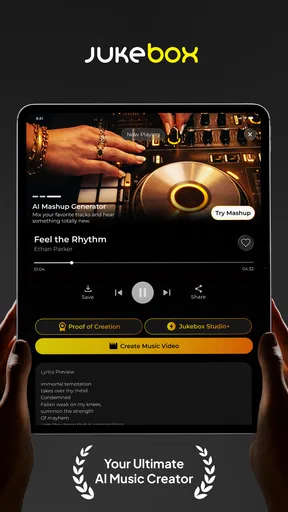
Our Review of AI Song Generator - Jukebox
 Analysis by Appyee
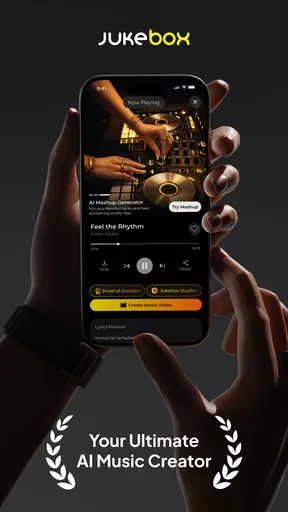
When I want to turn a passing musical idea into something I can actually hear, AI Song Generator - Jukebox is an inviting place to start. It belongs to the music and audio category, but it feels less like a traditional recording studio and more like a prompt-driven sketchpad: I can explore a song concept without first learning production software or owning instruments. That makes it appealing for curiosity and quick experiments, though I would not treat an AI-generated draft as a finished replacement for careful songwriting or arranging.
A quick way to test an idea
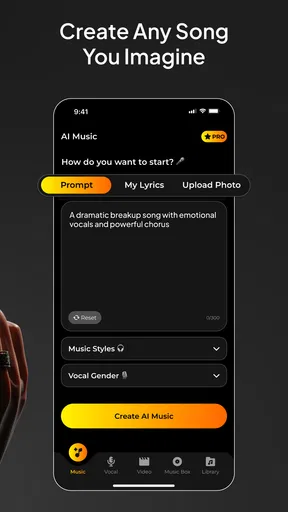
The useful question is not whether an app can make a song in one tap, but whether it helps me move from a vague thought to a direction worth developing. Jukebox is built around that first step. I can approach it with a mood, a genre, or a lyrical theme, then listen to what the system makes of the prompt. The result gives me something concrete to react to: perhaps the atmosphere feels right but the words do not, or the lyric suggests a different style than I expected.
That makes it especially handy for low-pressure creative exercises. I might ask for a playful song idea for a friend’s birthday, test whether a reflective theme works better as pop or something gentler, or use a generated verse to get past a blank page. I would still edit and shape the idea before sharing it as my own polished work. The app’s greatest value, in my experience, is helping me generate options quickly, not making every creative decision for me.
Getting Started with Jukebox
First things first, downloading the AI Song Generator - Jukebox was a breeze. Available on both Android and iOS, it was just a couple of taps before I was ready to jam. The interface is sleek and intuitive, which is always a plus in my book. No one wants to battle a complicated app just to get creative, right?
Once inside, you’re greeted with a clean dashboard. It’s like walking into a music studio without the intimidating knobs and wires. The app offers a variety of options to start crafting your tunes, whether you’re feeling funky, classical, or something in between.
Creating Your Masterpiece
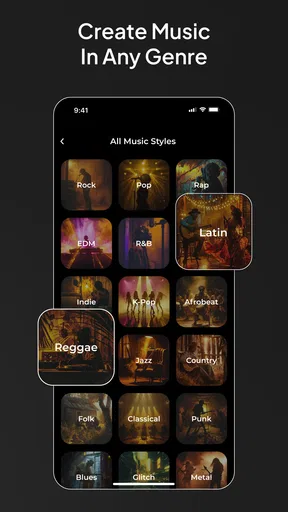
Now, here’s where the magic happens. The app uses advanced AI algorithms to help you compose music from scratch. You can choose a genre, set the tempo, and even pick instruments. It’s like having a mini orchestra at your command! I was genuinely surprised at how simple it was to put together something that didn’t sound like a cat walking across a piano.
One of the coolest features is the ability to generate lyrics. Yes, you heard that right. The AI can craft verses and choruses, giving you a full song. I tried it out with a pop track, and it came up with catchy lyrics that had me humming along.
Getting more from a prompt
I get better results when I treat a prompt as a small creative brief rather than a command to produce a perfect song. A useful starting point is to name one clear mood and one subject, then decide whether I want the words to feel conversational, dramatic, or playful. If I pile several unrelated ideas into one request, the output can feel scattered. Keeping the brief focused gives me a cleaner first draft and makes it easier to judge what I want to change.
For a more practical workflow, I listen once for the broad direction, then listen again with one question in mind: does the arrangement support the feeling I asked for? After that, I decide whether the lyric, genre, tempo, or instrument choice is the part I want to rethink. This is more useful than changing everything at once, because I can tell which choice improved the result. It is a small habit, but it turns casual generation into a more deliberate songwriting exercise.
Good for sketches, not every finished track
Jukebox sits between a blank-page songwriting tool and a conventional digital audio workstation. A DAW gives experienced users much finer control over recording, editing, mixing, and arrangement, but it can be a lot to learn when all I want is to explore an idea. A lyric-writing app, meanwhile, may help with words but will not necessarily give me a musical direction to hear. Jukebox’s appeal is that it brings those creative starting points together in a more approachable process.
The trade-off is control. If I already know the exact chord voicing, vocal phrasing, or mix I want, a prompt-based generator is not the most precise route. I would use a traditional music-production app for detailed editing and performance, and Jukebox when I need inspiration or a fast demo-like concept. That distinction matters: the generated track can be a useful reference for a human-made version without being the final version itself.
A realistic everyday use
Imagine I have a short video idea for a family celebration and want a musical bed that feels warm rather than overly sentimental. I can use a focused prompt to explore a few directions, listen for a mood that fits, and share a draft with someone involved before spending time polishing anything. The same approach works for a birthday surprise, a personal writing prompt, or a quick demonstration of how a lyric might sound with music behind it. In each case, I would treat the output as a starting point and check that it suits the audience before using it publicly.
That last step is worth keeping in mind. A generated song can sound plausible while still including a line or musical choice that feels wrong for the occasion. I recommend listening all the way through rather than judging by the opening seconds, especially if the track will be played for other people. A quick review for awkward wording, unintended tone, and overall fit can save an otherwise thoughtful gift or presentation from feeling impersonal.
Exploring the Features
The app isn’t just about creating; it’s also about learning and exploring. There’s a section where you can dive into different musical genres and get inspired by existing tracks. It’s like a built-in jukebox (pun intended) where you can discover new sounds and styles.
If you’re someone who’s curious about the tech behind all this, the app offers insights into how the AI models work. It’s fascinating to see how machine learning and music intersect to create something so innovative.
Who will enjoy it, and who may not
I would recommend Jukebox to curious beginners, casual creators, and songwriters who want a quick way to explore a theme before committing to a more involved process. It can also suit someone who does not play an instrument but wants to hear how a musical idea might feel. Its approachable setup lowers the barrier to experimentation, and the combination of music and lyric generation gives users more to react to than a page of text alone.
I would steer away from it if I needed exact professional control, a reliably consistent sound for a large project, or a substitute for learning an instrument and writing arrangements myself. It is also not the best fit if I already have a finished composition and only need precise audio editing. In those situations, a conventional audio workstation or a dedicated editing tool gives me a clearer path. Jukebox is strongest when uncertainty is part of the creative process and I am happy to explore rather than dictate every detail.
What to know before relying on a result
People often wonder whether they need music theory to begin. I do not think that is necessary for basic experimentation: describing a style, mood, or subject in ordinary language is a more approachable entry point. Some musical vocabulary can help me communicate a more specific direction, but the app is most useful when I treat each generation as a suggestion and listen critically rather than assuming the prompt will be interpreted exactly as intended.
Another practical consideration is how the app is paid for. Jukebox is free to download, with in-app purchases ranging from $4.99 to $102.99 per item. I would try the free experience first and decide whether I use it often enough to justify any optional spending. The listed age rating is Everyone, and the app is developed by TWOWISE Bilgi Teknolojileri Limited Sirketi. Its current version is 2.0.4, with a minimum operating-system requirement of 7.0.
Sharing, review, and creative responsibility
Once you’ve crafted your masterpiece, sharing it is a snap. The app lets you export your creations and share them on social media or with friends. I sent one of my tracks to a buddy, and they couldn’t believe it was made on a phone!
For those who love collaboration, the app also has features to team up with other users. You can work on projects together, adding layers and textures to each other’s tracks. It’s a fantastic way to connect with fellow music enthusiasts and creators.
For everyday use, I would make sharing part of a simple review loop: send a draft to one trusted listener, ask what mood they hear, then decide whether that matches the intention. A vague question such as “Do you like it?” often gives me less useful feedback than asking whether the track feels cheerful, calm, or dramatic. If the listener hears a different mood from the one I wanted, that tells me the concept may need another pass. This keeps collaboration focused on the song rather than turning it into a general popularity test.
I would also be careful about where and how I reuse a generated result. Before building a public project around any AI-made music, I would check the app’s current terms and the rules of the platform where I plan to publish it. That is sensible for any generative tool: a convenient export does not, by itself, answer every question about intended use. For a private brainstorm or a message to friends, the practical stakes are lower; for commercial work, I would make that check before investing more time.
How the app is developing
Jukebox was released on October 16, 2024, and its current version is 2.0.4. That gives me a concrete snapshot of a product that has moved beyond its initial release, but a version number alone does not tell me which capabilities changed or how any particular workflow has improved. I would not assume a specific feature was added just because the version has advanced. What I can say is that the current app is presented as a song-generation tool with music and lyric creation, genre exploration, and sharing among its described uses.
For someone who already uses it, the sensible approach is to keep working with the options available in the version on their device and judge any future change by whether it improves a real task: clearer prompt results, more useful control, or a smoother way to develop a draft. I would especially watch for changes that make revision easier, since generating a first idea is only one part of making a song feel personal. Until a change is actually visible in the app, though, I would treat it as something to look for rather than something to count on.
Final Thoughts
In the end, the AI Song Generator - Jukebox is a game-changer for anyone interested in music creation. Whether you’re a seasoned musician or a newbie just exploring, this app opens up a world of possibilities. It’s user-friendly, packed with features, and most importantly, it makes music creation accessible to everyone.
If you’ve ever wanted to dabble in songwriting or just want to see where your creativity can take you, give this app a try. Who knows, you might just create the next big hit!
Its audience figures suggest that plenty of people have already been willing to give it a try: it has over 1 million installs, a 4.7 average from around 49,000 ratings, and 605 written reviews. I take that as useful context rather than proof that every generated song will satisfy every listener. My recommendation is straightforward: if you want a friendly way to turn a loose idea into a musical draft, it is worth exploring; if you need exact studio control, choose a more hands-on production tool. The deciding factor is whether you want a spark to build on or a finished arrangement under your command.
Verdict
Strengths of AI Song Generator - Jukebox
- Easy to use with intuitive interface.
- Wide variety of music genres available.
- High-quality audio output.
- Fast processing and song generation.
- Regular updates with new features.
Limitations of AI Song Generator - Jukebox
- Limited customization options.
- Requires internet connection.
- Some genres may lack depth.
- Occasional lags on older devices.
- Subscription model for premium features.
Similar Picks in This Category
View All
YouTube Music
Google LLC4.4

Samsung Music
Samsung Electronics Co., Ltd.3.8

Spotify: Music and Podcasts
Spotify AB4.3

JioSaavn - Music & Podcasts
Saavn Media Limited4.3

Lark Player:Music Player & MP3
Lark Player Studio - Music, MP3 & Video Player4.6

StarMaker: Sing Karaoke Songs
SKYWORK AI PTE. LTD.4.3
Frequently Asked Questions
What features does the AI Song Generator - Jukebox offer?
The AI Song Generator - Jukebox provides an array of features, including the ability to generate songs in various genres and styles. Users can customize lyrics, select instruments, and adjust tempo. The app also allows for vocal synthesis, enabling the creation of full tracks with simulated voices. It's an excellent tool for musicians and hobbyists alike.
Is there a subscription fee for using AI Song Generator - Jukebox?
The AI Song Generator - Jukebox offers both free and premium versions. The free version includes basic features and limited song generation, while the premium version provides access to advanced tools, higher quality outputs, and unlimited song creation. Subscription plans are available on a monthly or yearly basis, with occasional discounts for long-term commitments.
How user-friendly is the AI Song Generator - Jukebox for beginners?
The app is designed with an intuitive interface, making it accessible for beginners. It includes a step-by-step guide and tutorials to help new users navigate the features easily. While some advanced functions may require a learning curve, the basic song creation process is straightforward, encouraging creativity without overwhelming complexity.
Can I export and share the songs created in AI Song Generator - Jukebox?
Yes, the AI Song Generator - Jukebox allows users to export their creations in multiple formats, such as MP3 and WAV. These files can be easily shared on social media platforms, emailed, or uploaded to cloud storage. The app supports direct sharing to popular platforms, making it convenient for users to showcase their work.
Does the AI Song Generator - Jukebox support collaboration with other users?
The app offers collaboration features that enable users to work on projects together. You can invite others to join your project, allowing real-time editing and feedback. This feature is particularly useful for bands or songwriting teams, ensuring seamless integration and creativity across distances. However, collaboration tools are primarily available in the premium version.
